
Download AI Sales Assistant – Free AI‑Powered Sales Automation Tool
Introduction – Why AI‑Driven Sales Automation Matters Today
In a world where sales cycles are shortening and buyers expect hyper‑personalized outreach, traditional manual prospecting quickly becomes a bottleneck. Companies that continue to rely on spreadsheets, endless copy‑and‑paste emails, and fragmented CRM updates often see their revenue pipelines dry out, while competitors that embrace automation gain a decisive edge. This is precisely the gap that AI Sales Assistant aims to fill. By combining state‑of‑the‑art large language models with deep integrations into the most popular CRM platforms, the tool automates the repetitive, time‑consuming tasks that drain sales teams and replaces them with intelligent, data‑rich interactions. The result is a streamlined workflow that lets reps focus on building relationships, negotiating deals, and closing business rather than hunting for leads.
The solution is built as a cloud‑native SaaS application, meaning you never have to worry about installing updates, managing servers, or dealing with compatibility issues. Whether your organization runs on Windows, macOS, Linux, or accesses the internet from a mobile device, AI Sales Assistant delivers a consistent, secure experience directly from the browser. Security and compliance are baked in, with end‑to‑end encryption, GDPR‑ready data handling, and role‑based access controls that keep sensitive prospect information safe. Over the next sections, we’ll dive deep into the platform’s core capabilities, walk through the onboarding process, explore system compatibility, and answer the most common questions you might have before deciding whether to add this AI‑powered assistant to your sales stack.
Overview & Core Features – What Sets AI Sales Assistant Apart
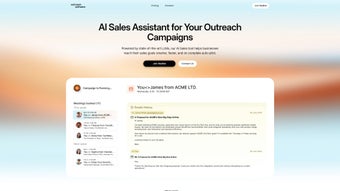
AI Sales Assistant is a cloud‑based web application that brings cutting‑edge artificial intelligence to the heart of every sales operation. Designed for service‑oriented and SaaS companies, this tool automates the most time‑consuming parts of prospecting, outreach, and follow‑up, allowing sales teams to focus on building relationships rather than chasing data. By leveraging large language models (LLMs), the assistant can generate personalized email copy, schedule meetings directly in the calendar, and even suggest talking points based on publicly available company data. The platform operates on an auto‑pilot mode, meaning once you define your outreach cadence and brand voice, the AI takes over, continuously feeding qualified leads into your CRM while you watch the pipeline grow.
What truly sets AI Sales Assistant apart is its seamless integration with the leading CRM ecosystems—HubSpot, Zoho, and Salesforce. Once connected, every prospect, interaction, and meeting note is automatically synced, eliminating manual entry and ensuring data integrity across your tech stack. The solution also includes a built‑in analytics dashboard that reports on open rates, response times, and conversion metrics, giving managers a real‑time view of campaign performance. Below is a detailed feature list that highlights the breadth of functionality.
- Automated lead discovery using AI‑driven market research.
- Personalized first‑contact email generation in seconds.
- Smart follow‑up sequencing with adaptive timing.
- One‑click meeting scheduling integrated with Google Calendar and Outlook.
- Deep CRM sync with HubSpot, Zoho, and Salesforce.
- Customizable outreach templates that match your brand’s tone.
- Real‑time analytics dashboard for open rates, click‑through, and conversion.
- Secure, GDPR‑compliant data handling and encrypted communication.
- Multi‑user access with role‑based permissions.
- Continuous AI model updates to keep messaging fresh and relevant.
Balanced Evaluation – Pros and Cons
No software is perfect, so it’s important to weigh the advantages against the limitations. Below you’ll find a concise, yet comprehensive, list of the most frequently cited strengths and areas where users see room for improvement. This balanced view helps you determine if the tool aligns with your organization’s specific needs and budget constraints.
What Users Love
- Time Savings: Automates repetitive outreach tasks, freeing up sales reps for high‑value conversations.
- Personalization at Scale: AI‑generated copy feels human‑written, boosting response rates.
- Seamless CRM Sync: Real‑time data flow eliminates manual entry errors.
- Data‑Driven Insights: Built‑in analytics provide clear ROI metrics.
- Security & Compliance: End‑to‑end encryption and GDPR compliance protect sensitive lead data.
- Scalable Architecture: Cloud‑native design supports teams of any size without performance degradation.
Areas for Improvement
- Learning Curve: Initial configuration of sequences and AI tone settings can be complex for new users.
- Subscription Cost: Premium tiers may be pricey for very small businesses.
- Dependency on Internet: As a fully cloud‑based tool, a stable connection is essential.
- Limited Offline Access: No desktop client for offline prospecting.
- Customization Limits: Some niche industries may require deeper integration than currently offered.
- Language Support: While multilingual, the AI currently supports only five major languages.
Installation, Usage & Compatibility – Getting Up and Running Quickly
Simple, Secure Onboarding Process
Because AI Sales Assistant is delivered as a SaaS solution, there is no traditional “installation” on a local machine. The onboarding process begins with a secure sign‑up page where you create an account using your corporate email. After email verification, you’ll be prompted to choose a subscription tier—starter, professional, or enterprise—each offering different levels of outreach volume and advanced AI features. Payment is handled via a PCI‑compliant checkout, and you receive an instant receipt with a subscription ID for future reference.
Once logged in, the first step is to connect your existing CRM. A guided wizard walks you through OAuth authentication for HubSpot, Zoho, or Salesforce, granting the AI Sales Assistant read/write permissions. The connection is encrypted end‑to‑end, ensuring that prospect data never leaves your trusted ecosystem without your consent. After the CRM link is established, you’ll import or define your target audience segments using built‑in filters (industry, company size, geography, technology stack, etc.). The AI then begins crawling public sources to enrich each lead with key decision‑maker details, LinkedIn profiles, and recent news—information that appears directly on the lead card for quick reference.
Day‑to‑Day Workflow
With leads loaded, you configure an outreach sequence. The interface offers a drag‑and‑drop builder where you can set the number of touchpoints, delay intervals, and preferred channels (email, LinkedIn InMail, or SMS). For each step, the AI suggests copy variations based on your brand voice—formal, conversational, or industry‑specific. You can accept a suggestion with one click, edit it further, or let the AI generate a fresh version on the fly. Once the sequence is active, the platform automatically sends messages, tracks replies, and moves prospects through the pipeline.
All activities are logged in real time to your connected CRM, so sales reps can see exactly where each prospect stands without switching tools. The dashboard also highlights prospects that have engaged, allowing you to prioritize high‑intent leads for personal follow‑up. If a prospect books a meeting, the AI automatically proposes time slots based on both parties’ calendars and sends a confirmation email with a secure video‑call link.
Supported Environments
AI Sales Assistant runs entirely in modern web browsers, making it compatible with Windows, macOS, Linux, ChromeOS, iOS, and Android devices. Tested browsers include Google Chrome, Microsoft Edge, Mozilla Firefox, and Apple Safari (version 12+). Because the platform is cloud‑hosted, you benefit from automatic updates, zero‑maintenance patches, and always‑latest AI models without needing to download a separate app.
Frequently Asked Questions & Conclusion – Your Next Steps
Below you’ll find answers to the most common queries from prospects who are evaluating AI Sales Assistant. These FAQs address everything from trial availability to data privacy, giving you the confidence to make an informed decision. After the questions, we’ll wrap up with a clear call‑to‑action that guides you toward a risk‑free trial and the onboarding process.
Is there a free trial available for AI Sales Assistant?
Yes, AI Sales Assistant offers a 14‑day free trial with full access to all core features. You can sign up without providing a credit card, and the trial automatically converts to a paid subscription only if you choose to continue after the period ends.Can the AI generate outreach content in languages other than English?
The platform currently supports English, Spanish, French, German, and Portuguese for email and message generation. Future updates plan to add additional languages based on user demand, ensuring global teams can benefit from localized outreach.How does AI Sales Assistant ensure data privacy and GDPR compliance?
All data transmission is encrypted with TLS 1.3, and personal data is stored in EU‑based servers for GDPR‑covered customers. The platform provides tools for data export, anonymization, and deletion upon request, giving you full control over prospect information.What CRM systems are supported out of the box?
AI Sales Assistant integrates natively with HubSpot, Zoho CRM, and Salesforce. For other CRMs, a generic API connector is available, allowing custom integration via webhooks and REST endpoints.Is there a mobile app for managing campaigns on the go?
While the primary interface is web‑based, the platform is fully responsive and works on iOS and Android browsers. A dedicated mobile app is in development and slated for release in Q3 2025, which will bring push notifications and offline draft capabilities.If you’re ready to transform your sales outreach, the next step is simple: click the download button, create your free 14‑day trial account, and start building intelligent sequences that work while you focus on closing deals. Our onboarding specialists are on standby to guide you through CRM integration, AI tone configuration, and best‑practice workflow design. Experience the future of sales automation today—download AI Sales Assistant now and watch your pipeline fill itself.
Pros:
- Highly personalized AI copy at scale
- Deep integration with major CRMs
- Real‑time performance dashboards
- Secure, GDPR‑compliant data handling
- Scalable cloud infrastructure
Cons:
- Initial setup requires time investment
- Premium pricing may be steep for very small teams
- Limited offline capabilities



.png)



